I Gave Flodesk Studio One Sentence. Minutes Later, My Email Was Done!
There is a very specific kind of confidence required to open a completely blank email and think, “Oh heck yes, I know exactly what to design today!” Before Flodesk Studio, that optimism usually led to 30 minutes of dragging in blocks, moving photos around, testing a banner, deciding the banner felt weird, and questioning why choosing an image shape had suddenly become the biggest decision of my week. Somehow, I usually end up back inside the same template I have used for the last five launches. She is reliable, she knows where everything goes, and at this point, she may qualify as a member of the team!
I know how to create an email. I have used and loved Flodesk for years. But when I want something completely fresh instead of reaching for one of the same templates I have used during my last five launches, the blank page is where I get stuck.
That is exactly why I wanted to put Flodesk Studio to the test.
So when Flodesk invited me to try its newest email-design experience, and I knew I need to TEST the heck out of it: Could I give Studio a simple idea, offer almost no details, and create a finished email that still looked and sounded like me? We all know what happens with generic AI prompts..
I did not want to create a pretend email that would never see the light of someone’s inbox, so I used a real task from my business. I needed to announce a new free resource, explain why it was valuable, and make it incredibly easy for people to download.
Normally, starting from scratch would take this elder millennial about 30 minutes. Studio helped me finish it in four and a half minutes, and yes, I checked the clock twice!
The Blank Page Was the Real Problem
I have loved Flodesk for years because the platform itself is incredibly easy to use. The templates are beautiful, the email builder makes sense, and I can create something that feels like my brand without needing a coding degree or a design team hiding somewhere in my office.
My issue was never Flodesk. My issue was the moment before the email existed, because a blank page can turn one simple email into a full creative identity crisis.
I know what I want the reader to understand, but then I start wondering whether the image should go above the headline, beside the copy, inside a shape, or nowhere at all. Naturally, I test four ideas because apparently I enjoy learning the same lesson repeatedly!
I wanted Studio to give me momentum without taking my voice out of the process.
I wanted a strong foundation that helped me move faster into the part of the work that actually needed my brain. That distinction matters, especially when the whole point is to create something that still sounds and looks like you.
Flodesk Studio is an AI email-design app, and now my favorite place to create. Real designers built the system the AI runs on so the foundation is human-designed from the beginning which makes my legacy heart SING.
Studio is accelerated, not generated. You bring the idea, make the choices, shape the message, and finish the work without having to begin with the blinking cursor of doom.
The One-Sentence Prompt That Started Everything
For this first test, I intentionally gave Studio very little information. I wanted to see what would happen if I used it the way a busy business owner might use it between a client call, school pickup, and reheating the same cup of coffee for the third time.
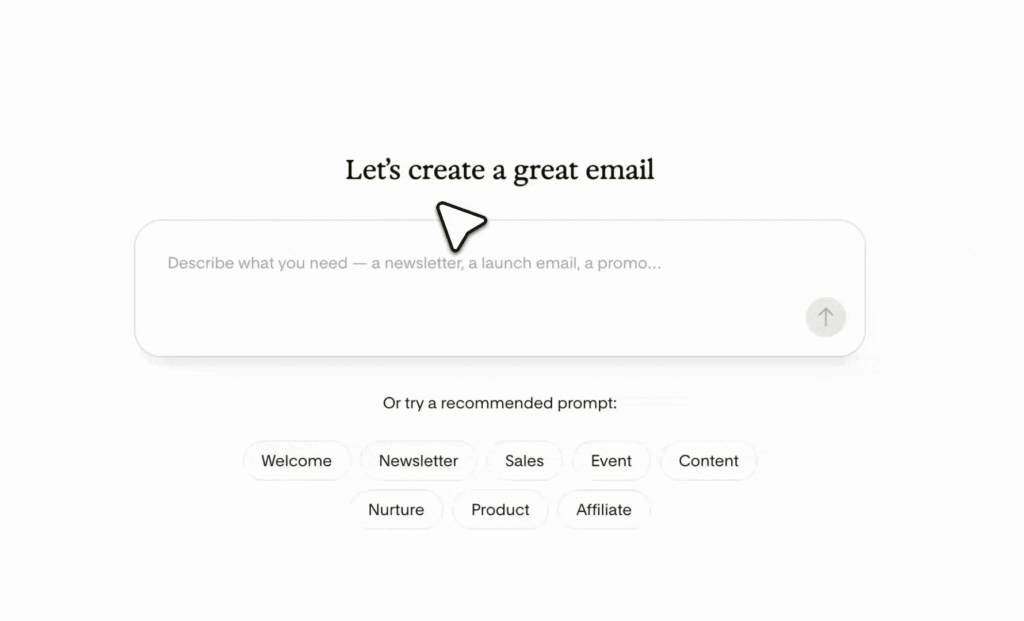
I selected one of the suggested prompts inside Studio: “Write an email promoting a free resource I just created. Highlight why it’s valuable and make it easy to download.” That was all I gave it, and I mean ALL.
I did not tell Studio the name of the resource, who it was for, what problem it solved, or how I wanted the email to sound. I did not add my favorite Jamie phrases, explain the transformation, or provide the details that would normally make the message stronger.
This was the email-design equivalent of handing someone one puzzle piece and saying, “You’ve got this!”
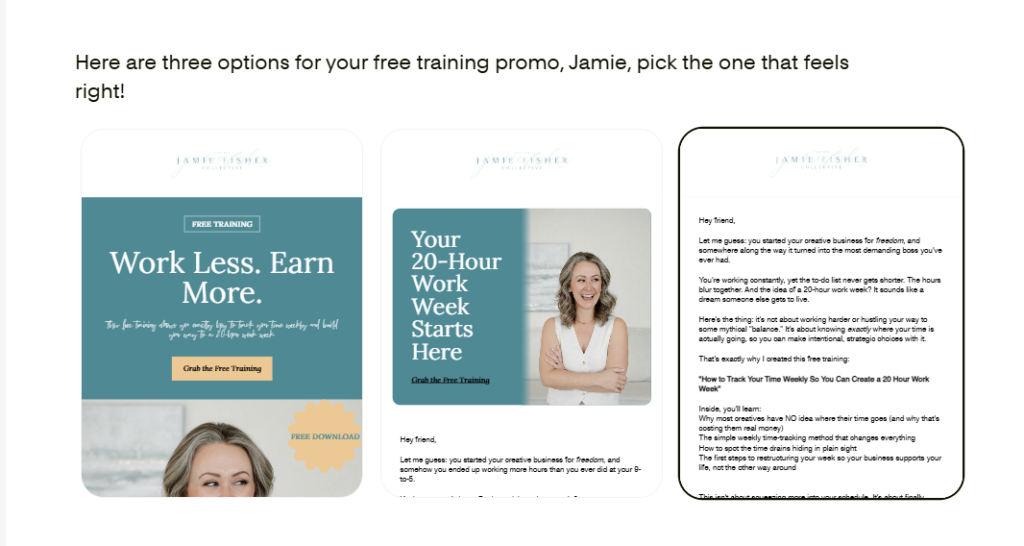
Studio asked for the tiniest bit of information (I held back BIG TIME) and gave me three initial directions: a visual email, a banner-led version, and a plain-text option. I started with the first design, the visual direction, because it felt closest to the type of email I would naturally create and send on a free resource announcement.
My immediate reaction was, “Wait. This is already good!” It was not good in the way you praise a child for drawing a person with one arm growing out of its forehead, either.
It was actually good!
The layout felt current, the sections worked together, and the design gave the message a natural flow.
I had barely told Studio anything! I was expecting a starting point, but I was not expecting such a strong one.
Flodesk Studio? 9/10
The first draft got me about 80 percent of the way there, which was exactly what I needed. I did not want to press a button and remove myself from the creative process, but I was very happy to skip the part where I spend 20 minutes deciding whether two blocks look friendly beside each other.
Studio gave me a polished place to begin, and then I stepped in and Jamie-fied it!
I made a few minor layout adjustments, swapped the colors to better match my brand, and changed several lines of text. I did not need to rebuild the structure, delete half the design, or quietly return to my faithful launch template while pretending the experiment had never happened.
The finished email still felt like something I would send because I was still the one making the final decisions.
And remember, this happened with almost no direction from me. I kept thinking about what Studio could have created if I had included the name of the free training, a clear description of my audience, the problem the resource solves, the tone I wanted, and the specific action I wanted readers to take.
That version may have completely blown me out of the water! For a first test, though, I wanted to see what Studio could do before I gave it the full JFC encyclopedia.
Studio, like my beloved Flodesk, can also store detailed brand information so your marketing stays consistent. If you do not have an established brand yet, there are pre-made brands that can give you a strong starting point.
That means you do not have to invent a visual identity while writing an email, naming your freebie, and trying to locate the download link you swear you saved somewhere obvious.
You can create through prompts, edit manually, or move between both approaches depending on how your brain wants to work that day. Some days I know exactly what I want to create, and other days my complete creative brief is, “Please make this feel exciting and not like the last five emails I sent!”
Both versions of me can create inside Studio, and neither one has to begin by staring at a blank page.


Four and a Half Minutes, One Finished Email, and Zero Design Spirals
From a completely blank screen, this email would normally take me around 30 minutes. Again, that is not because Flodesk is difficult; it is because … me. Ha!
I try a design element, see how it fits, move it, resize it, decide I liked the first version better, and then repeat the process with another section. The actual writing may be ready, but the design turns into its own tiny renovation project that nobody approved a budget for.
With Studio, the entire process took four and a half minutes!
That may not sound dramatic until you multiply it across a welcome sequence, a launch, an event promotion, a monthly newsletter, or the freebie email that has been sitting on your list for three Tuesdays because you cannot decide how you want it to look.
Twenty-three minutes here. Thirty minutes there. An entire afternoon lost because you wanted to test one more layout before making your final decision.
That time adds up!
Time is not an abstract benefit inside my business. Time is the thing I am constantly helping other creatives reclaim, because I want them to make more money and have a life they are actually available to enjoy.
I want them to close the laptop, go to dinner, attend the field trip, sit through the softball game, and stop feeling like every good idea requires another entire afternoon to execute.
A tool that helps me create something strong in minutes earns my attention very quickly!
From Studio Straight Into My Flodesk Account
Once I finished the email, I sent it directly into my Flodesk account, and the process was SUPER simple! I did not need to recreate the design, copy every section into a new email, or play a risky little game called “Which version did I edit last?”
The finished email moved exactly where I needed it so I could complete the setup and send it through the email platform I already use. There was no rebuilding, no digital duct tape, and no sudden urge to abandon the entire project and reorganize a closet instead.
Studio works best with Flodesk, but you are not boxed into one sending platform. You can design inside Studio and export the HTML to any email service provider that supports HTML.
That means you can design here and send anywhere. WHO ELSE IS DOING THIS?!
Studio is email-first for now, with forms, pages, and other marketing materials coming later. The manual builder already includes headers, banners, lists, testimonials, countdowns, polls, content sections, invitations, quotes, signatures, recipes, and personal bios.
There are drag-and-drop stickers you can move and rotate freely, fresh modern layouts, new sticker and image shapes, and block-card styles including solid, grain, and blur. These details let you create something polished without forcing every email to look like it came out of the exact same box.
Creative freedom remains alive and well!
Flodesk is also building Studio in public, so the experience is changing quickly as people use it and share what they need. The team is shipping features daily and learning alongside the creators and business owners building inside it which is also another reason why I LOVE being a brand partner with Flodesk.
That matters to me because I do not need another bloated tool trying to become 14 businesses at once. I need a focused place that understands email, design, and how actual small business owners work.
Why the Human-Designed Foundation Matters
Good design is not the cute little extra you add after the “important” work is finished. Design helps people decide whether they trust you, and it shapes what they notice first, how they move through your message, and whether the email feels consistent with the rest of your brand.
Your website can be beautiful, your photos can be intentional, and your offer can be incredible. But if your email arrives looking like it wandered in from a completely different company, the experience breaks.
That is one reason I have loved Flodesk for so long. The platform understands that an email is not merely a container for words; it is a brand touchpoint.
The free resource announcement should feel like you, and the launch email should feel like you. Even the completely unplanned story about something that happened in the school pickup line should still feel like you!
Studio begins with systems created by real designers, so the starting point already understands spacing, hierarchy, balance, and flow. The technology speeds up the path, but human design remains underneath it.
That is why my first draft looked polished even when my prompt was so basic—a breath of fresh air in this AI era.
Studio did not replace my taste, my message, or my knowledge. It removed enough of the setup that I could put my time into the details only I could add.
That is the difference between a tool that removes you from your work and a creative space that helps you get into your work faster.
Who Should Try Flodesk Studio?
You should try Studio if a blank page regularly turns a 20-minute task into a 90-minute creative detour. You should also try it if your emails keep looking like the same trusted template wearing a new photo and hoping nobody notices.
It gives beginners a beautiful place to start while giving experienced creators a faster path to fresh design. You can use a pre-made brand, store your own detailed brand information, begin with a prompt, build manually, or move between those approaches as you create.
Most importantly, you stay in the work.
Your perspective still matters. Your edits still matter. Your understanding of your audience still matters, and the final creative choices still belong to you.
Studio simply moves the blank screen out of your way faster.
Flodesk Studio is free in beta, and Flodesk is using the beta period to figure out what pricing will look like. There is no future price to share yet because they genuinely do not know.
That means this is a great time to bring a real idea into Studio and play!
Start with an email you have already been meaning to send. Try a simple prompt, look at the three directions, choose the one that feels closest to your brand, and make it yours.
Start creating today in Flodesk Studio!
Ready to Send Beautiful Emails Through Flodesk and Save 25%?
Studio gave me a fresh email design in minutes, but Flodesk is still where I manage the email marketing that supports my business. It is the system I have trusted for years to send beautiful emails, build workflows, serve my audience, and keep important communication moving without chaining me to my computer.
If you want to see how that has looked in my real life, read my honest Flodesk review for creatives. It includes the day Flodesk kept my business moving while I rode a yellow school bus and spent the day on a field trip with my daughter.
If you are ready to create emails that look like your brand without turning the process into a full tech project, you can start Flodesk free and save 25 percent on your first year through my partner link.
Start Flodesk free and save 25% on your first year!
This first Studio experiment started with one broad sentence and almost no information. Four and a half minutes later, I had a finished email inside my Flodesk account that looked polished, felt fresh, and only needed a few changes to sound like me.
I did not lose the creative part of the process and I gained nothing but time.
I have a life to live, a business to grow, and at least one cup of tea I’ve misplaced that our dog will find before me. If you’re ready for all the goodness that comes from running your email marketing with Flodesk and want to try Flodesk for yourself, you can start free and receive 25 percent off your first year using my partner link below.
Tap the button below to use my code to start free and get 25% off your first year of Flodesk:
https://flodesk.com/c/JAMIEFISHER
This post was created in paid partnership with Flodesk. When you choose to sign up using my partner link, I may receive compensation. I only partner with tools I personally use and trust inside my business.
LOVE GETTING MORE TIME BACK?
Then you’ve got to check out THIS BLOG POST next!